
In Windows
- Click in the window you want to capture to make it the active window.
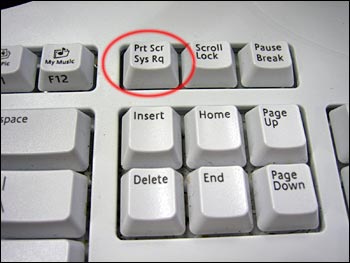
- Press the “Print Screen” button (Prt Scn) to capture your entire screen. (Hold the ‘Alt’ key and tap the “Print Screen” button to capture just your active window.)
- Open Microsoft Paint. To do this, click Start > All Programs > Accessories > Paint. (or Word or other graphics program)
- Click inside the white part of the screen.
- Paste the screenshot by one of the following methods:
- From Edit dropdown menu select Paste.
- Type Ctrl-V. (Hold the Ctrl button and tap V.)
- Right click and select Paste. (more…)
